Google Fitbit Air review: Not the Fitbit you remember

- Incredibly lightweight and comfortable
- In no way distracting
- Seven day battery life
- iOS or Android compatible
- No screen
- No contactless payments
- Iffy workout detection
- Fitbit features (and fun) removed from Google Health app
- Google AI front and centre
The Google Fitbit Air, to give the first new Fitbit since 2023 its full name, is not the Fitbit you remember. The brand’s early trackers circa 2014 were fun, no frills gadgets that tracked steps and movement and pitted you against your friends to see who could walk the furthest.
Pioneering devices like the Fitbit Flex and Fitbit Charge encouraged people to take up exercise more regularly and maybe get a little fitter and happier. Sometimes there was a screen, but it wasn't that distracting. If you wanted to run a marathon, there was always Garmin. Then in 2021, Google acquired Fitbit.
I’ve been wearing the Fitbit Air for 13 days, and despite its screenless design recalling those early Fitbits, this is a Fitbit in name only. For all intents and purposes, the Fitbit Air is a Google fitness tracker, a very stripped down alternative to the Pixel Watch 4.
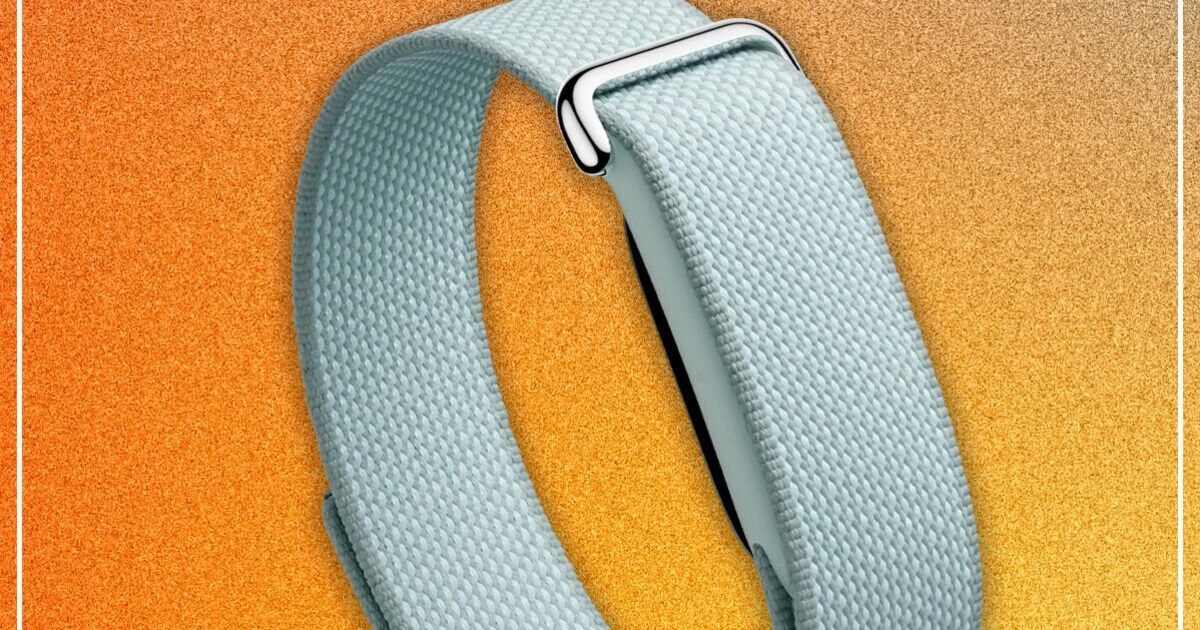
It’s a tiny pebble-like tracker with a heart rate sensor that clips into a comfy material band, collecting your steps, heart and movement data throughout the day. It costs £84.99, the exact same as 2022’s Fitbit Inspire 3, which has a display. The Air is the Fitbit to get if you want to track basic stats without the distraction a screen brings to most smartwatches.
The design of the Air signals Google is shooting for Whoop, a rival subscription model fitness tracker popular with serious athletes and backed by stars such as Cristiano Ronaldo and Rory McIlroy. Also screenless, it passively collects your fitness data, with all insights found in its data-heavy app.

In a change timed to coincide with the release of the Fitbit Air, the Fitbit app is no more. In its place is the Google Health app, which is the Fitbit app rebranded. You can only log in to this app with a Google account.
Gone are the leaderboards and challenges Fitbit fans will fondly remember, and Google is even deleting all the Fitbit badges once ceremoniously awarded to existing Fitbit users who have had to transfer their data to a Google account.
It’s also axing the fun sleep animal feature that matched up your slumber patterns to an animal’s, along with a full app interface redesign.
We now have a data-first dashboard with Google Gemini AI front and centre. It’s less intimidating than Whoop’s app, and is designed to give you actionable feedback on your fitness and sleep, with the ability to log meals with photos, connect rival fitness apps and even connect your medical records. The latter option, which is mainly set up so far with US healthcare providers, is a potentially slippery slope. When healthcare providers can see your Fitbit (sorry, Google) health data, it leaves the door open for future nefarious incentives to offer customers discounts on health insurance and other services if they have the latest gadget.
... the Fitbit Air is a Google fitness tracker, a very stripped down alternative to the Pixel Watch 4.
In the here and now, if you pay the £7.99 per month subscription fee, you can also ‘Ask Coach’, which brings up a ChatGPT-like conversation with Gemini. This is where you can let the AI know your back hurts or you want to do three runs per week, or, in my case, that I have a newborn, which is why my sleep patterns are so wrecked.
If you’ve read this far and are wondering when I am going to talk about the Fitbit Air and not the Google Health app, unfortunately this is reflective of the experience of using the Fitbit Air.
As a screenless fitness strap, the Air relies entirely on the app experience, just like Whoop does and like those early Fitbits once did. And now, that app is fully Google’s, and it needs you to let it know what’s going on in your life for it to give you the best feedback.
That leaves the Fitbit Air in an odd place, simultaneously trying to be like the early, basic Fitbits, but linked to an app embracing the AI age. I can’t help but feel the Google Health app will be more useful to Pixel Watch owners, who can more accurately track more sports and activities from their wrists. The app feels overblown if you have a Fitbit Air just to count steps and sleep.

Along with the app’s name change, Fitbit Premium is now Google Health Premium. It still costs £7.99, and offers personalised health plans using the Google Health Coach AI, gives more detailed insights into sleep, gives access to a library of workouts and mindfulness sessions.
That said, you don’t have to pay a subscription to get basic metric tracking. Not paying leaves you with activity tracking, sleep tracking, health tracking of heart, heart rate variability, breathing rate and blood oxygen levels, as well as logging weight, food, water and your mood.
I found the Air a little too keen to record steps, which it did when doing things like washing up. It also struggled to know I was on a walk when pushing a pram rather than swinging my arms. But the heart rate metrics seem accurate, and the tracker can detect potential atrial fibrillation, but not perform an ECG as it lacks the hardware.
In testing the paid version of Google Health, I let Coach know about my young son, as well as my ongoing foot injury from running. After a day or two, I enjoyed the AI’s natural language advice and the fact it took these factors into account in discussing my bad sleep and steady walk plans each morning.

But I didn’t tell the app anything else for a few days, and a pattern begins to emerge: without telling the AI more about your life and habits, it can’t give you improving feedback. All its advice was about newborn sleep debt and foot pain. It was a reminder that for AI tools to be useful, you have to put quite a lot of data in in order to get any useful data back.
The Fitbit Air lacks built-in GPS, but it can connect to your iPhone or Android phone to use connected GPS in order to plot your run, cycle or hiking routes. For this to work, you have to start an exercise from the Google Health app. It works well, but regular runners should look elsewhere for a watch with a display - you won’t want to check your phone screen all the time for your stats.
The design of the Air signals Google is shooting for Whoop, a rival subscription model fitness tracker
The Air has workout auto-tracking, which should log a walk or run even if you don’t start it from the app, but I found this temperamental. It didn’t recognise my first two walks in testing. It did recognise my first run, but then started recognising subsequent walks as runs, which I had to correct in the app later.
Google says the Air has up to seven days of battery life, which I found to be accurate. Charged to full with the proprietary charging cable, I only had to charge once in 13 days, on the eighth day of use. This is good battery life, but it’s notably less than the older Inspire 3, which can last for ten days with the always-on display feature turned off.
There’s a vibration feature, but it’s only for silent alarms. That’s handy for your morning wake up call, but it’s a shame you can’t set it to buzz when you’re getting a call on your phone.
There is also no NFC, so no option for contactless payments.
Perhaps I am being harsh on the Fitbit Air, but the experience of wearing and using one is far removed from the fun whimsy that the Fitbit brand was once known for.
Perhaps I am being harsh on the Fitbit Air, but the experience of wearing and using one in 2026 is far removed from the fun whimsy that the Fitbit brand was once known for. Perhaps someone without fond memories of the old Fitbit will be less critical and enjoy the Air for what it is: a subtle, comfortable health tracker that - even without a subscription - gives solid daily health metrics and impressively accurate sleep tracking.
But most people looking in this price range will be better served by the Fitbit Charge 6, which is regularly on sale for less than its £139 RRP. It has a screen, the same seven day battery life, contactless payments and built-in GPS. That said, any Fitbit and Fitbit user now has to use the Google Health app, which as described in this review, fundamentally changes how the device works via your phone.
The identically priced Fitbit Inspire 3 £84.99 is also a good alternative, with a display but less mature design. The Xiaomi Smart Band 10 also matches the Inspire's specs and features for less than half the price at £42.99, making it a solid Air alternative.
The Google Fitbit Air is a good set-and-forget tracker for those with simple fitness band needs. But it’s very much a Google device, which requires a Google account and for you to tell Google’s AI a lot about your life to be at its most helpful. For anyone who wants to track more than the occasional run, you’re going to need to spend extra on a more advanced Garmin, Suunto or Coros smartwatch - or, as Google hopes, a much more expensive Google Pixel Watch.

Daily Express